Software and business toolsYour software has aged, or never really matched the way you work?
A tool installed ten years ago, a package configured for a different organisation, files that make up for what the software cannot do: teams adapt, until the day the workarounds cost more than the tool. Kopus helps you decide what to keep, replace or build, and develops business software that fits the way you work.
Decision diagramReading the signs before choosing the route
The same signal can lead to three different decisions: a spreadsheet kept beside the tool sometimes reveals a simple gap, sometimes a foundation that has to be left behind. That is why every sign is read through the same four criteria before we give an opinion, and the migration is only prepared when replacement is genuinely justified. Maintaining what exists remains a full outcome, not a default choice.
Observed signs
- Spreadsheets live beside the official tool
- Data re-keyed across several screens
- Requested changes never arrive
- Only one person, or one vendor, can keep it running
- No exchange with the other software
Reading on four criteria
- Technical foundationsoundfragile
- Cost of workaroundscontainedhigh
- Risksunder controlcritical
- Ability to evolverealblocked
argues for keepingargues for replacing
Cursor placed during the analysis, on facts
Three outcomes
- RepairImprove and maintain what existsWhen: Sound foundation, limited gaps
- ComplementA component connected to the tool in placeWhen: One precise gap, a core that holds
- ReplaceSoftware designed for your businessWhen: Costly workarounds, evolution blocked
Under "replace": the migration, without interrupting the business
- Data take-overWhat is taken over, cleaned or archived
- Consistency checksBefore any switch
- Parallel runIf needed, while everything is verified
- Training on your casesThe users, on their own files
- SupportThe first weeks
- Success measured by adoptionWorkarounds gone, information shared
What we seeThe signs that software is holding the company back
Teams keep spreadsheets alongside the official tool. Some operations require several screens and re-keying. The changes requested from the vendor never arrive, or come at a prohibitive price. The tool only works on one workstation, does not open up to other software, and only one person still knows how to keep it running.
These signals do not all mean that everything must be replaced. They indicate that it is time to look closely at what the tool really does, and what the business expects of it.
Our approachRepair, replace or complement: decide on facts
We analyse the tool in place, the data it holds, the processes it covers and the workarounds that surround it. Three outcomes are possible: improve and maintain what exists, complement it with a connected component, or replace it with software designed for your business.
The choice is made on the technical base, the real cost of the workarounds, the risks (security, dependence on one person or one vendor) and the tool’s ability to evolve with the company.
How we workSoftware that fits the business, not the other way round
When replacement is justified, we design the tool from the real work: the screens follow what users actually do, the business rules are yours, the connections with your other software are planned from the start. The scope is split so as to deliver a first useful set quickly, then extend it.
The code and the data belong to you, the documentation exists, and the tool can evolve without depending on a single supplier or a single person.
What you gainMigrate without interrupting the business
Data migration is prepared with care: what is carried over, cleaned or archived, the consistency checks, the period of parallel running if needed. Users are trained on their own cases, and the first weeks are supported.
Success is measured by adoption: workarounds that disappear, information finally shared, teams that no longer need to outwit their tool.
 iPad app
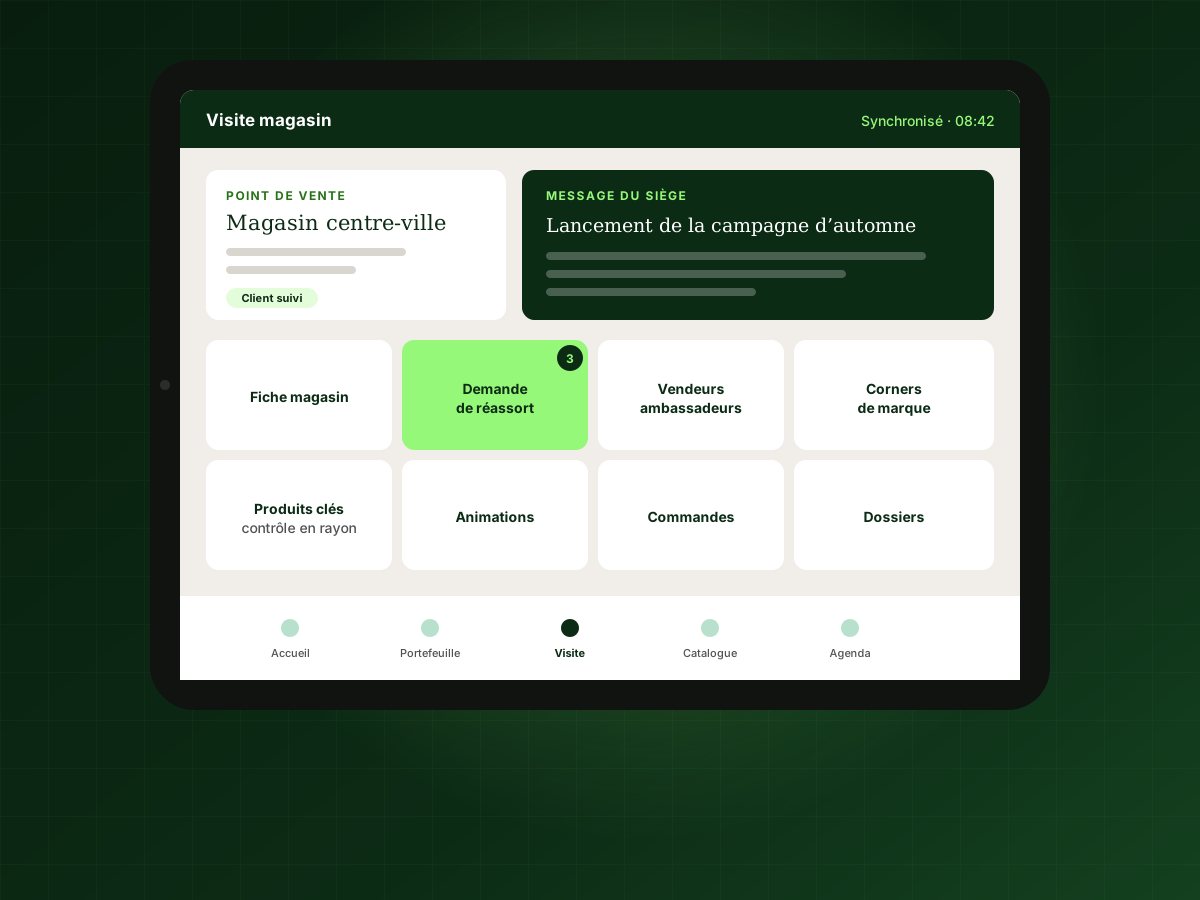
An iPad app for the field sales force
See the projectProjectProject: from files and paper catalogues to a single application
For the sales representatives of a major international sports brand, every store visit relied on files, paper catalogues and email exchanges with head office. Kopus designed an iPad application that brings together everything a representative needs to know and do in store, the outlet’s profile, key products, restocking, promotions, and feeds the information back to head office. A tool suited to the job in place of a pile of makeshift means.
Your questionsFrequently asked questions
Ask a questionDo we have to replace everything at once?
Rarely. A component connected to the existing system, or a first module that replaces the most painful part, is often safer. A full replacement is prepared in stages.
Our data is in an old system. Can it be recovered?
In most cases, yes, by export, by direct access to the database or by processing the files. Feasibility and the clean-up work are assessed during the framing phase.
Isn’t custom software more expensive than an off-the-shelf package?
At purchase, sometimes. Over time, you have to compare licences, adaptations, workarounds and the cost of a tool nobody uses well. We do that calculation with you before recommending a route.
Who maintains the software afterwards?
Kopus can provide maintenance and further development, or hand over the documented code to your team or to another provider. You are not locked in.
Related servicesThe services that address this challenge
- 03 · Web & softwareCustom software developmentCustom software is not a luxury; sometimes it is the only way to do exactly what your business requires. We design it as an investment: useful from the start, solid for the long run.
- 03 · Web & softwareCustom business softwareInternal tools are rarely spectacular, but they are what saves every employee an hour a day. We design them with the people who will use them, so they are adopted from the first week.
- 03 · Web & softwareApplication maintenanceSoftware that is not maintained ages fast: vulnerabilities, slowdowns, incompatibilities. We look after your applications over time so they stay secure, fast and able to evolve.
- 03 · Web & softwareAPI integrationYour tools are fine; what is missing is that they talk to each other. We build the connections that move information automatically, with no re-entry, no omission, no spreadsheet in between.
- 03 · Web & softwareWeb application developmentWhen a spreadsheet is no longer enough and no off-the-shelf software fits the way you work, a custom web application becomes the right tool. We design it with your users, for your real workflows.
Your challengesRelated challenges
I want to bring AI into my company
Spot the AI uses that make sense and keep control of decisions.
Explore this challenge Your challenges · 06I want to launch a SaaS platform
Go from your product idea to a first platform that can be operated.
Explore this challenge Your challenges · 09I want to take my business international
Choose the right markets, adapt your offer and roll out step by step.
Explore this challengeLet’s bring your projects to life
A tool that works for your teams, not against them.
Tell us about your current software, what it does not do and the files that make up for it. We will tell you what it is reasonable to keep, complement or replace.